Mobile Proxies for App QA and Mobile-First Verification
VoVoProxy mobile proxies send your test traffic through IP addresses on mobile networks, so you can check how apps, APIs and mobile web pages behave for people browsing on a cellular connection. The mobile pool uses the same billing as every pool: prepaid traffic per whole GB, a 1 GB minimum, and no subscription. You get location targeting, rotating or sticky sessions, and HTTP and SOCKS5 support.
This page is for QA engineers, mobile product teams and verification specialists who need to see the mobile experience as it actually reaches users in a given market.
Why Test Through a Mobile IP Proxy
Testing on a real device is only half the picture. The other half is the network. Many services adapt what they return depending on whether a request comes from a mobile network, a home broadband line or a server. That includes:
- Content and layout. Mobile-first sites may serve lighter pages, different images or app install prompts to mobile network visitors.
- Regional behavior. Store listings, promotions, language, currency and feature flags can vary by country and city.
- Network-dependent logic. Some apps change media quality, retry behavior or onboarding flows based on network conditions and origin.
- Ads and placements. Mobile ad inventory and creatives can differ from desktop. Our guide to proxies for ad verification covers this in depth.
If your QA lab sits on office Wi-Fi in one city, you cannot see these differences directly. A mobile IP proxy lets your devices, emulators and automated tests send requests as if they originate from a mobile network in the location you choose.
Mobile Proxies for App Testing: Common Workflows
Mobile proxies are a specialized tool. They work best for checks where the mobile network origin genuinely changes the result.
App QA across markets
Route a test device or emulator through a mobile proxy targeted at a specific country or city, then step through onboarding, localized content, pricing screens and in-app messaging. Use a sticky session so the app keeps the same IP throughout a test case.
Mobile-first web verification
Check that your mobile site serves the correct language, legal notices, cookie consent and regional offers. Combine a mobile user agent and viewport with a mobile proxy to see the complete picture.
Mobile network testing
Validate that your backend, CDN rules and API gateways treat mobile network traffic as intended, including geo-routing, caching and any mobile-specific rules.
Release checks in key markets
Before a launch, run a short regression pass from each target market. The US, UK and Germany are available across pools, which makes them easy starting points. See US proxies, UK proxies and Germany proxies for market notes.
How the request path works
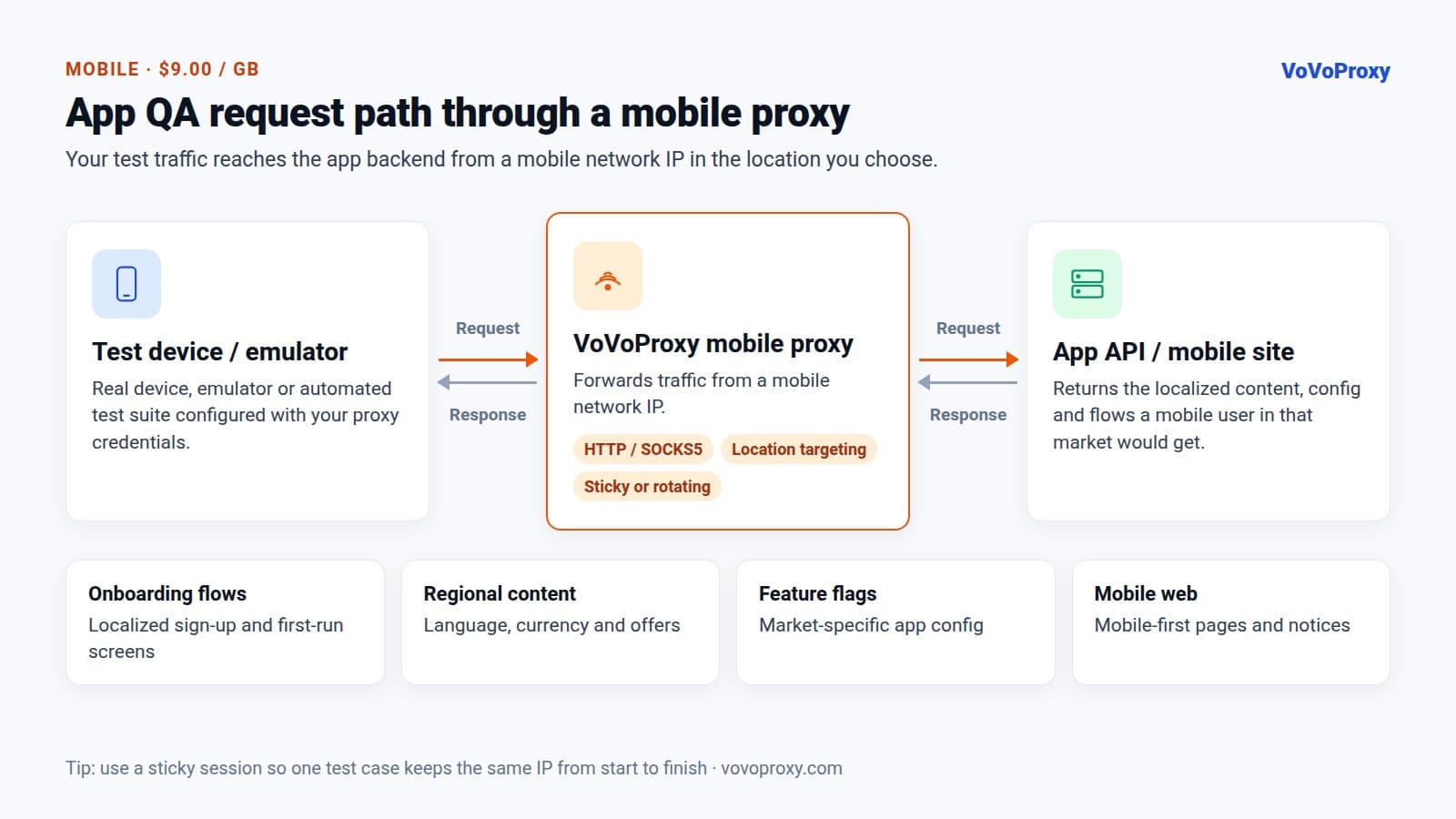
Your test device or automation framework connects to the mobile proxy using the credentials from your portal. The proxy forwards the request from a mobile network IP in the location you selected, the app backend or website responds, and the response comes back to your device for inspection.
Mobile Proxy Per GB Billing
Mobile IPs are a more specialized resource than datacenter or residential IPs. The billing model is the same across every pool: per whole GB, prepaid, no subscription.
| Pool | IP source | Best suited for |
|---|---|---|
| Datacenter | Data center infrastructure | Data collection, monitoring, automated testing |
| Residential | Residential networks | Localization checks, ad verification, market research |
| Mobile | Mobile networks | Mobile app QA, mobile-first verification, mobile network testing |
| Premium Residential | Higher-trust residential pool | Sensitive verification, brand protection |
Practical notes on mobile proxy per GB billing:
- 1 GB minimum. Start small and measure.
- Prepaid balance. Traffic is deducted as you use it, and the portal shows remaining balance and usage history.
- Dedicated account per pool. Your mobile account is separate from any datacenter or residential account, so test budgets stay clear. Top up the same account when you need more.
Use the right pool for each job
A practical QA setup usually mixes pools. Run bulk functional and API checks through datacenter proxies, use residential proxies for desktop and home-network localization checks, and reserve mobile proxies for the cases where mobile network origin matters. Our comparison of residential vs datacenter vs mobile proxies goes deeper.
To keep mobile usage efficient, disable automatic app updates and background syncing on test devices, avoid streaming media unless it is part of the test, and use the usage history in the portal to see which test suites consume the most traffic.
Setting Up Mobile Proxies
Mobile proxies support HTTP and SOCKS5, with a username and password per account. The portal generates ready-to-paste connection strings. You can choose rotating IPs or sticky sessions and target by location; the exact host, port and targeting or session parameters are shown in the portal.
On a test device
Most Android and iOS devices let you configure an HTTP proxy in the Wi-Fi network settings. Enter PROXY_HOST and PROXY_PORT, then supply USERNAME and PASSWORD when prompted. For SOCKS5 or per-app routing, use your device management or testing tool's proxy settings.
In automated tests
Point your automation framework or HTTP client at the proxy. A quick API check in Python:
import requests

proxy = "http://USERNAME:PASSWORD@PROXY_HOST:PROXY_PORT"
headers = {"User-Agent": "Mozilla/5.0 (Linux; Android 14) Mobile"}

r = requests.get(
    "https://api.example.com/v1/config",
    proxies={"http": proxy, "https": proxy},
    headers=headers,
    timeout=30,
)
print(r.status_code, r.json())
Or with curl:
curl -x "http://USERNAME:PASSWORD@PROXY_HOST:PROXY_PORT" \
  -A "Mozilla/5.0 (iPhone; CPU iPhone OS 17_0 like Mac OS X) Mobile" \
  https://m.example.com/
Rotating or sticky?
Use sticky sessions for any test that spans several screens or requests, so the backend sees a consistent client. Use rotating IPs when you sample many independent checks. Read more in what is a rotating proxy.
Getting Started, Security and Responsible Use
Onboarding is short:
- Create an account at vovoproxy.com/register.
- Choose the Mobile pool and the number of GB on the pricing page.
- Pay with crypto at checkout.
- Your account is provisioned automatically, typically within minutes.
Credentials are stored encrypted. VoVoProxy does not access or store the content of your traffic; account, order and usage records are kept for billing, security and support.
Mobile proxies are for lawful QA, verification and testing work. Illegal activity, fraud, spam, malware and abuse of third-party systems are prohibited. When testing services you do not own, follow their terms and rate limits. See the terms of service.
Mobile Proxies FAQ
How much do mobile proxies cost?
Mobile proxies are billed per GB, prepaid, with a 1 GB minimum and no subscription. Unused traffic stays in your balance, and the current per-GB price is shown on the pricing page.
What is a mobile proxy used for?
At VoVoProxy, the mobile pool is intended for mobile app QA, mobile-first verification and mobile network testing, where seeing traffic from a mobile network IP changes what you test.
Can I choose the location of the mobile IP?
Yes. The mobile pool supports location targeting, and the countries and options available for it are listed in the console. See the pricing page for how targeting affects billing.
Should I use sticky sessions for app testing?
Usually, yes. Sticky sessions keep the same IP across a multi-step test case, so the app backend sees one consistent client. Rotating IPs suit independent, one-off checks.
Do mobile proxies support SOCKS5?
Yes. HTTP and SOCKS5 are both supported, with per-account credentials and ready-to-paste connection strings in the portal.
Test the Mobile Experience Your Users Get
Start with 1 GB of mobile traffic and see how your app behaves on a mobile network in your target market. Check pricing, then create an account and choose the pool and volume — your account is typically ready within minutes of payment.