Proxies for SEO Rank Tracking and Local SERP Monitoring
Proxies for SEO give you a view of search results from the locations your customers actually search from. Search engines personalize results heavily by location, so a ranking you see from your office may be very different from the ranking a shopper sees in Austin, Manchester or Denver. If your reporting is based on one vantage point, it can be quietly wrong.
VoVoProxy helps SEO teams, agencies and local businesses check search results by country, state, city or ASN. You pay per GB with a 1 GB minimum, there is no subscription, and you can choose rotating IPs or sticky sessions depending on the job.
This guide covers why local SERPs differ, which pool to use, how to set up a responsible rank tracking workflow and how to estimate traffic.
Why rankings change from city to city
Search results are not a single list. The same keyword can return different results depending on where and how the search happens. Key factors include:
- Location. Local intent queries like "emergency plumber" or "best pizza near me" return different map packs and organic results in every city.
- Country and language. A query in the US and the same query in the UK can surface different domains, currencies and spelling variants.
- Network type. Results can vary between residential, mobile and business connections.
- SERP features. Map packs, shopping units, featured snippets and "People also ask" boxes appear or disappear by market.
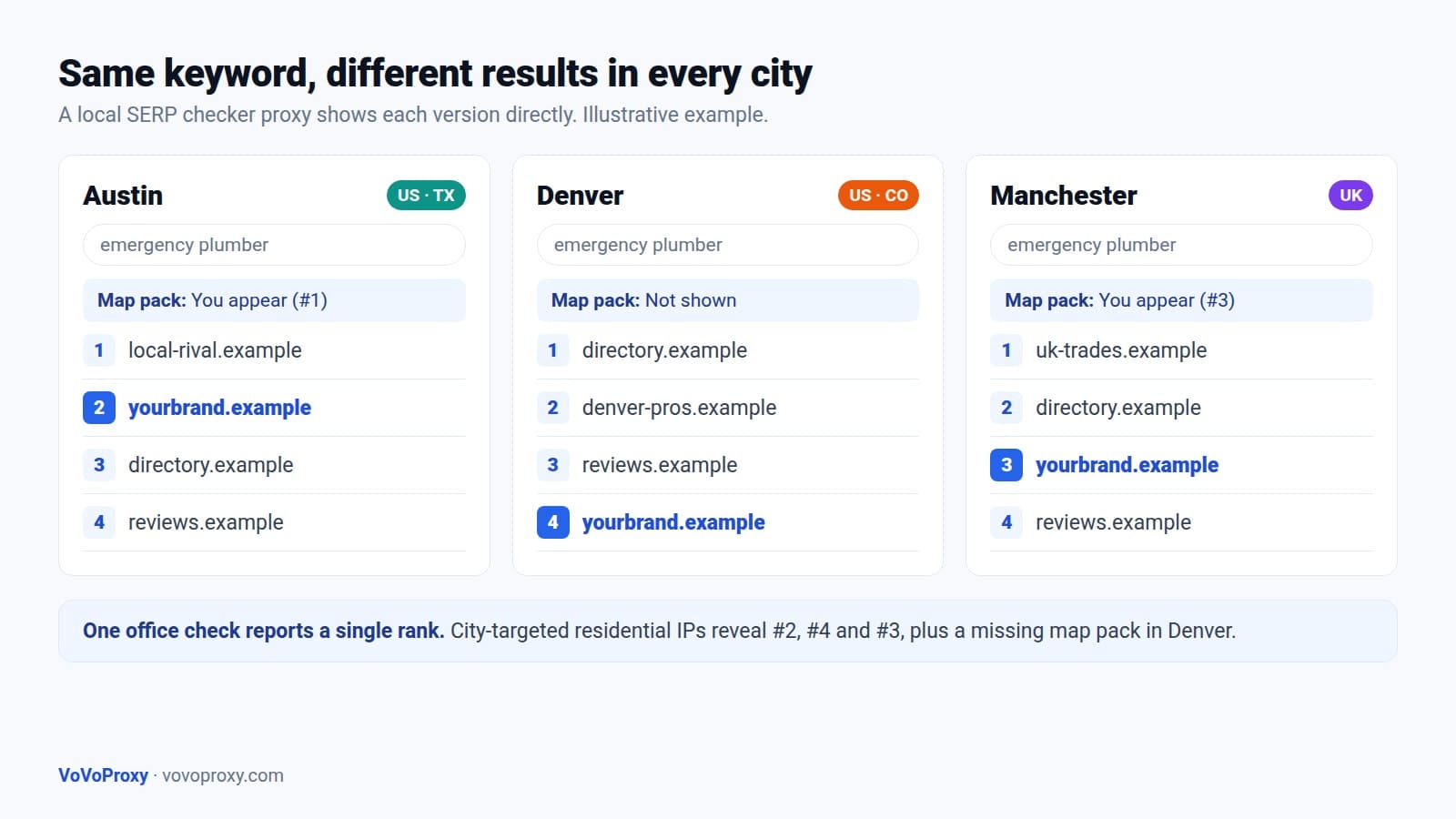
For a business that serves several cities, this is the difference between a report that says "we rank #2" and the reality that you rank #2 in one city, #7 in another, and are missing from the map pack in a third. A local SERP checker proxy lets you see each version directly.
What a rank tracking proxy does
A rank tracking proxy routes your search requests through an IP address in the market you want to measure. Instead of guessing what a searcher in Seattle sees, you request the results from a Seattle-area IP and record them.
With VoVoProxy you can:
- Target by country, state, city or ASN, depending on the pool. US, UK and Germany are available across pools.
- Use rotating IPs so each check comes from a fresh IP, which is useful for broad sampling across many keywords.
- Use sticky sessions when you need several requests from the same IP, such as loading a result page and then checking page two.
- Connect over HTTP or SOCKS5 with per-account username and password, using ready-to-paste connection strings from the portal.
For US local SEO, our page on US residential proxies with state and city targeting explains location options in more detail. For British markets, see UK proxies for UK localization.
Which proxy pool to use for SEO
The right SERP proxy depends on the accuracy you need and how many checks you run. Every pool is billed per GB with a 1 GB minimum and no subscription; current prices are listed on the pricing page.
| Pool | SEO use | When to choose it |
|---|---|---|
| Residential | Local rank tracking, city-level SERP checks, localization review | Default choice: residential network IPs with location-level targeting and broad coverage |
| Mobile | Mobile SERP checks, mobile-first verification | When mobile rankings and mobile SERP layouts matter most |
| Datacenter | Monitoring your own sites, technical SEO checks, uptime and redirect tests | High throughput when residential context is not needed |
| Premium Residential | Brand protection, sensitive verification of branded queries | Higher-trust pool for high-stakes checks |
Most SEO teams run local rank tracking on Residential proxies and add Mobile for a smaller set of priority keywords where mobile results drive most of the traffic. Datacenter is a practical choice for checking your own pages, such as hreflang redirects, canonical tags or server responses, across many URLs.
A responsible rank tracking workflow
Good rank tracking is about consistent, modest sampling, not maximum volume. Here is a workflow that produces reliable data while staying respectful of search engines and websites.
1. Build your keyword and location matrix. List each keyword with the markets that matter. A plumber in three cities needs city-level checks for local terms, while a national ecommerce brand may only need country-level checks for most keywords.
2. Set a sensible schedule. Daily checks are usually enough for priority keywords; weekly is fine for long-tail terms. More frequent checks rarely add insight.
3. Choose session behavior. Use rotating IPs for independent checks across keywords. Use sticky sessions when a check needs multiple pages from one IP.
4. Pace your requests. Add delays between requests, respect rate limits and follow the terms of the services you query. Where an official API or approved data source meets your needs, consider using it.
5. Record context with every result. Save the keyword, location, device type, timestamp and SERP features. Without context, rank changes are hard to interpret.
6. Compare and act. Look for patterns: a page that ranks well in one city but not another may need stronger local signals, such as a dedicated location page or more local reviews.
A simple Python example of fetching a page through the proxy looks like this. The exact host, port and targeting or session parameters are shown in your portal.
import requests, time

proxy = "http://USERNAME:PASSWORD@PROXY_HOST:PROXY_PORT"
proxies = {"http": proxy, "https": proxy}

urls = ["https://www.example.com/locations/austin"]
for url in urls:
    r = requests.get(url, proxies=proxies, timeout=30)
    print(url, r.status_code, len(r.content))
    time.sleep(5)  # pace requests and respect rate limits
VoVoProxy is for lawful use only. Respect robots.txt, site terms and rate limits, and do not attempt to bypass CAPTCHAs or other security controls. See our terms for details.
Estimating traffic and cost
Because VoVoProxy bills per GB, it helps to estimate usage before you buy. A rough formula:
Monthly GB = keywords x locations x checks per month x average page size
For example, if you track 200 keywords in 5 cities once a day, that is about 30,000 checks per month. At an average of 0.3 MB per request, that is roughly 9 GB. Real page sizes vary, so measure a sample of your own requests first to confirm the estimate.
Ways to keep usage efficient:
- Request only the HTML you need rather than loading images, fonts and video.
- Track long-tail keywords weekly instead of daily.
- Check country-level results for national keywords, and save city-level checks for local intent terms.
- Watch the portal, which shows your remaining balance and usage history, and top up the same account when needed.
FAQ
Why do I need proxies for SEO?
Search results change by location, language and network type. Proxies for SEO let you see results from the markets your customers search in, so your rank reports reflect what real searchers see.
What is a local SERP checker proxy?
It is a proxy targeted to a specific city or state, used to check local search results such as map packs and local organic rankings. VoVoProxy supports country, state, city or ASN targeting, depending on the pool.
Which pool is best for rank tracking?
Residential is the default choice for local rank tracking. Use Mobile for mobile-focused checks, and Datacenter for technical checks on your own websites.
Should I use rotating or sticky sessions for SERP tracking?
Use rotating IPs for independent checks across many keywords. Use sticky sessions when one check needs several requests from the same IP, such as viewing more than one results page.
How much traffic does rank tracking use?
It depends on keywords, locations, frequency and page size. Multiply those together for an estimate, and measure a sample of your own requests. The portal shows usage history so you can refine your estimate.
Do I need a subscription?
No. Traffic is prepaid per GB with a 1 GB minimum and deducted from your balance. There is no subscription.
Track rankings from your customers' locations
Stop guessing what searchers see in each city. Create an account, choose the pool and volume on the pricing page, and pay with crypto at checkout. Your account is provisioned automatically, typically within minutes.
View pricing to compare pools and get started from 1 GB.