Brand Protection Proxies: See How Your Brand Appears to Real Users in Every Market
Brand protection proxies let your team see marketplaces, search results, ads and websites exactly as a real consumer in each market sees them. That matters because many infringers show one version of a page to the brand owner and another to shoppers. By routing checks through residential or mobile exit IPs in the target country, you capture what customers actually see and collect evidence you can use in takedown requests. VoVoProxy offers exit IPs in every market marked as available in our locations directory, with targeting by country, state, city or ASN. Pool coverage differs by location; the directory shows availability per country and the console shows the options for your pool.
Why Brand Owners Need a Local View
Checking your brand from your office network often misses the problem:
- Cloaking. Counterfeit stores, phishing pages and some affiliates detect visitors from corporate or datacenter networks and show a harmless page, while real shoppers see the infringing one.
- Regional listings. Marketplaces and search engines show different sellers, results and ads in each country, and sometimes in each city.
- Geo-targeted ads. Ads that bid on your brand terms may only run in selected markets, at selected times.
- Mobile-only abuse. Some scams target only mobile visitors, through app install pages or mobile-specific landing pages.
A local exit IP on a residential or mobile network removes these blind spots, so what you record matches what your customers encounter.
What to Monitor
| Threat | Where it appears | What to capture |
|---|---|---|
| Counterfeit listings | Marketplaces and social commerce, by country | Listing page, seller name, product images, ship-to market |
| Unauthorized sellers | Marketplaces and independent stores | Seller details, listing URL, regions where the listing is visible |
| Lookalike and phishing sites | Domains that imitate your brand | Rendered page, final URL after redirects, hosting details, timestamp |
| Search ad misuse | Paid results for your brand terms | Search query, ad text, display URL, landing page, exit location |
| Affiliate compliance | Affiliate landing pages and coupon sites | Claims about your brand, banned keywords, redirect chains |
| Fake app listings | Third-party app stores and download sites | Listing page, publisher name, download URL |
| Impersonation | Social profiles and support scams | Profile URL, content, contact details shown to users |
Monitor publicly accessible pages only. Do not sign in to accounts you do not own, and follow each platform's terms of service.
A Brand Protection Workflow
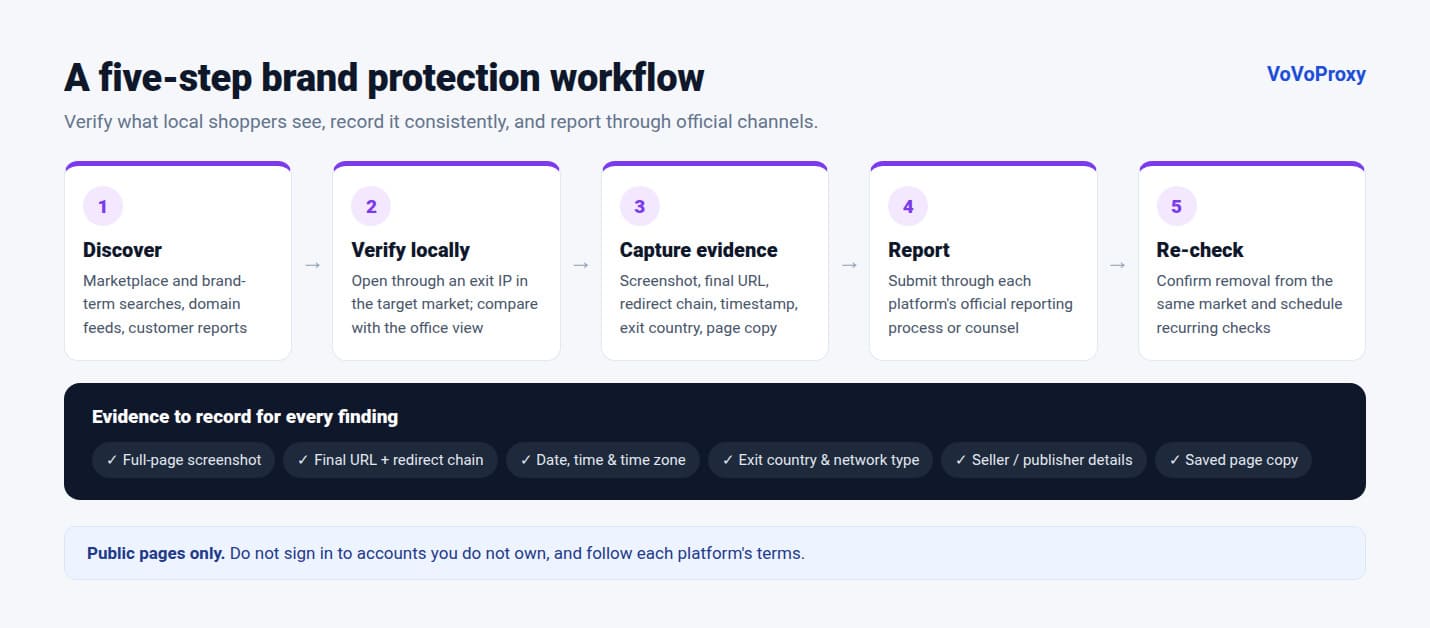
- Discover. Collect candidates from marketplace searches, brand-term searches, domain registration feeds, customer reports and your sales team. Run discovery from the countries where you sell.
- Verify locally. Open each candidate through an exit IP in the market where it targets shoppers. Use a clean browser profile, and a mobile exit IP for mobile-only pages. Compare with what your office network sees; a difference is a strong sign of cloaking.
- Capture evidence. For each finding, record a full-page screenshot, the final URL, the redirect chain, the date and time with time zone, the exit country and network type, and a saved copy of the page. Consistent evidence makes takedown requests faster to review.
- Report through official channels. Submit takedown or infringement reports through each marketplace's, search engine's, registrar's or host's own reporting process, or through your legal counsel.
- Re-check. After a takedown, verify removal from the same market and network type. Infringers often reappear under new sellers or domains, so schedule recurring checks.
For multi-page flows, such as following an ad through to a checkout page, use a sticky session so the IP does not change mid-flow. For broad discovery, rotate IPs to sample many local views.
Choosing a Pool and Targeting Level
| Task | Recommended pool | Targeting level |
|---|---|---|
| Evidence for takedown requests, cloaked or high-value cases | Premium Residential | Country or city |
| Routine marketplace and search monitoring | Residential | Country |
| Mobile-only scams, fake app pages and mobile ads | Mobile | Country, or ASN for a specific operator |
| High-volume discovery on sources that do not cloak | Datacenter | Country |
| City-level ads or local seller listings | Residential | City |
Premium Residential is built for checks where a wrong result is expensive. When evidence goes into a legal or platform review, accuracy matters more than volume. Current rates are on the pricing page.
Related Workflows
Brand protection overlaps with other monitoring work:
- Ad verification: confirm that your own ads, and your partners' ads, show the right creative and landing page in each market.
- Price monitoring: track how your products are priced and listed by resellers across regions.
- SEO rank tracking: see who ranks for your brand terms in local search results.
- Localization QA: make sure your official site is the one local users can find and trust.
Every country and region we cover is listed in the global locations directory.
FAQ
What is a brand protection proxy?
It is a proxy that routes your monitoring traffic through an exit IP in a chosen country, usually on a residential or mobile network. It lets you see marketplaces, search results, ads and websites the way local consumers see them, including pages that hide infringing content from brand owners.
Why do counterfeit sites look different from my office?
Some infringing sites use cloaking: they detect corporate, datacenter or brand-owner traffic and show a harmless page. Checking through a residential or mobile exit IP in the target market shows the version real shoppers receive.
Which proxy type is best for brand protection?
Premium Residential for accuracy-critical evidence and cloaked pages, Residential for routine monitoring, Mobile for mobile-only scams and app listings, and Datacenter for high-volume discovery on sources that do not cloak.
What evidence should I collect for a takedown request?
A full-page screenshot, the final URL and redirect chain, the date and time with time zone, the exit country and network type, the seller or publisher details, and a saved copy of the page. Then submit it through the platform's official reporting process.
Is it legal to monitor my brand with proxies?
Monitoring publicly accessible pages for brand protection is a common, legitimate practice, but rules vary by country and platform. Do not access accounts you do not own, respect each site's terms, and consult your legal team about how you collect and use evidence. VoVoProxy may only be used for lawful purposes.
Can I monitor several countries at once?
Yes. Every market marked as available in our locations directory can be targeted from one pool account; you switch locations through the targeting parameters in your portal. Pool coverage differs by location, so check the directory or the console before planning a run.
Protect Your Brand in Every Market
Tell us the markets, platforms and volume you monitor. We will recommend a pool and targeting setup and confirm it in writing before you pay.