Proxies for Ad Verification: Check Ads the Way Real Users See Them
Ad verification proxies let you load your campaigns from the same networks and locations as your real audience, so you can confirm that the right creative shows up, in the right place, for the right people. When you check ads from your office connection, you only see one version of the truth. Your audience in Chicago, Munich or on a mobile carrier network may see something very different.
VoVoProxy gives ad ops, agencies and brand safety teams a simple way to run those checks. You buy traffic per GB, choose a pool that matches the audience you are verifying, and target by country, state, city or ASN. There is no subscription, and traffic is prepaid and deducted from your balance.
This guide explains what ad verification looks like in practice, which proxy pool fits each check, and how to build a repeatable workflow.
Why ad verification needs location-accurate IPs
Modern ad delivery is shaped by the viewer's context. Ad servers and publishers decide what to show based on location, network type, device and sometimes the type of IP address making the request. That makes verification from a single location unreliable.
Common problems that only show up from the user's point of view include:
- Geo targeting mistakes. A campaign meant for California also serves in Texas, or a German-language creative is missing in Germany.
- Wrong creative or landing page. A localized landing page redirects to the wrong market or shows an outdated offer.
- Brand safety issues. Your ad appears next to content that breaks your placement rules.
- Redirect chains that change by region. Tracking links resolve differently depending on where the click comes from, which can hide misconfigured or suspicious redirects.
- Mobile-only behavior. Some placements and app-install flows only render on mobile networks.
Proxies for ad verification solve this by routing your checks through IPs in the target market. Residential and mobile IPs are especially useful because they look like the networks real viewers use, so the page you capture is closer to what your audience actually receives.
Choosing the right pool for each ad check
Not every check needs the same pool. Matching the pool to the task keeps results accurate and traffic use predictable. Every pool is billed per GB with a 1 GB minimum and no subscription; current prices are listed on the pricing page.
| Pool | Best for in ad verification | Why it fits |
|---|---|---|
| Residential | Geo ad testing, localization checks, landing page review | Residential network IPs with location-level targeting and broad coverage |
| Premium Residential | Sensitive verification, brand protection, investigating suspicious placements | A higher-trust pool for checks where result quality matters most |
| Mobile | Mobile web ads, app-install flows, mobile-first verification | Mobile network IPs with location targeting |
| Datacenter | High-volume monitoring of your own landing pages and tracking endpoints | High throughput for bulk monitoring |
A practical split many teams use:
- Run routine geo ad testing across markets on Residential.
- Escalate high-stakes cases, such as a suspected brand safety incident or an affiliate dispute, to Premium Residential proxies.
- Use Mobile when the campaign is mobile-first or when the ad unit only appears on mobile networks.
- Use Datacenter for uptime and redirect checks on infrastructure you control, where residential context is not required.
An ad verification workflow: request, render, compare
A good verification process is repeatable. Each check follows the same three steps, so results can be compared across markets and over time.
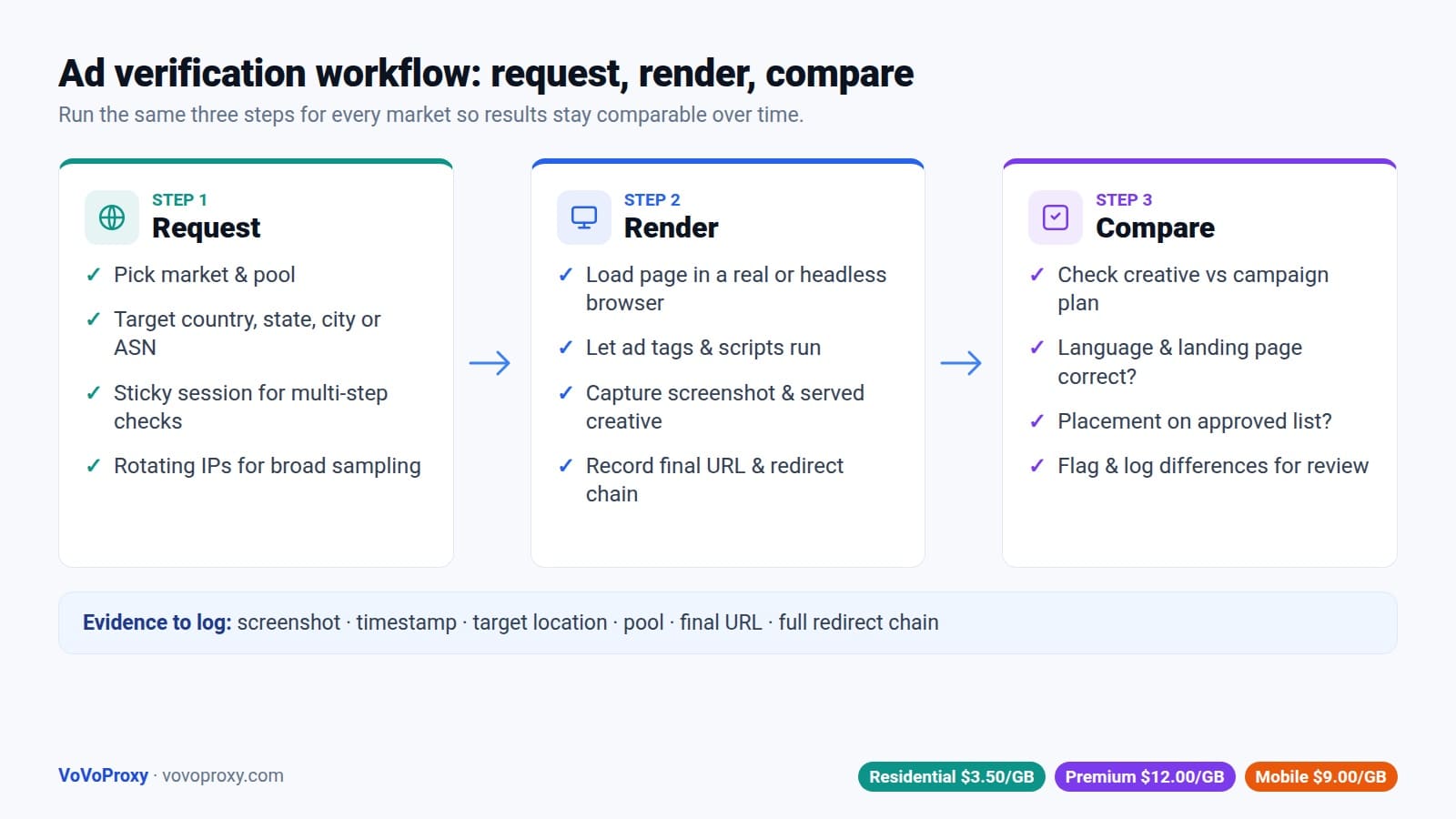
1. Request. Pick the market and pool, then send the request through a proxy targeted to that location. For US campaigns you might target a specific state or city; see our guide to US proxies with state and city targeting. For EU campaigns, Germany proxies are a common starting point. Use a sticky session when one check needs several page loads from the same IP, and rotating IPs when you want independent samples.
2. Render. Load the page in a real or headless browser so scripts, ad tags and redirects run as they would for a viewer. Capture a screenshot, the final landing URL, the full redirect chain and the creative that was served.
3. Compare. Check the results against your campaign plan: was the expected creative shown, in the correct language, on an approved placement, with the correct landing page? Flag any differences for review.
Here is a minimal example of the request step using Python and Playwright. The exact host, port and targeting or session parameters are shown in your VoVoProxy portal.
from playwright.sync_api import sync_playwright

PROXY = {
    "server": "http://PROXY_HOST:PROXY_PORT",
    "username": "USERNAME",   # targeting/session options as shown in the portal
    "password": "PASSWORD",
}

with sync_playwright() as p:
    browser = p.chromium.launch(proxy=PROXY)
    page = browser.new_page()
    page.goto("https://publisher.example/article", wait_until="networkidle")
    page.screenshot(path="check_us_ca.png", full_page=True)
    print("Final URL:", page.url)
    browser.close()
Both HTTP and SOCKS5 are supported, and the portal generates ready-to-paste connection strings for each account.
Using proxies for ad fraud detection
An ad fraud detection proxy is not a magic fraud detector. It is a vantage point. It lets your team observe what is really being delivered so you can spot patterns that warrant investigation, such as:
- Placements that look normal from your office but redirect to unrelated or low-quality pages from certain regions.
- Affiliate or partner links that resolve to a different destination than reported.
- Ads appearing on domains that are not on your approved placement list.
- Landing pages that change content depending on the visitor's location or network.
When you find something suspicious, Premium Residential is a good choice for follow-up checks, because it is designed for sensitive verification and brand protection. Document every finding with screenshots, timestamps, the target location and the full redirect chain. That evidence helps when you raise the issue with a publisher, network or partner.
Keep investigations within your own campaigns and publicly accessible pages. Do not click ads in bulk, generate fake impressions or interact with third-party systems in ways their terms do not allow. VoVoProxy is for lawful use only, and fraud, spam or abuse of third-party systems is prohibited under our terms.
Best practices for reliable results
A few habits make ad verification data far more useful:
- Define a check matrix. List each campaign, market, device type and pool you need to cover. This keeps coverage consistent and makes traffic needs easy to estimate.
- Match targeting to the campaign. If a campaign targets a state or city, verify at that level rather than only at country level.
- Choose session behavior on purpose. Sticky sessions for multi-step flows like click-through to landing page; rotating IPs for broad sampling.
- Keep volume reasonable. Verification is about sampling, not hammering publishers. Respect site terms and rate limits.
- Log everything. Store screenshots, URLs, redirect chains and timestamps so results can be audited later.
- Watch your usage. The portal shows your remaining balance and usage history, so you can see what each verification cycle costs and top up the same account when needed.
To estimate traffic, multiply the average page weight of a full render by the number of checks per cycle. Blocking heavy media you do not need, such as video files on non-video placements, can reduce GB use without affecting the result.
FAQ
What are ad verification proxies?
Ad verification proxies route your checks through IP addresses in specific locations, so you can see the ads, placements and landing pages that real users in those markets see. They help confirm geo targeting, creative delivery and brand safety.
Which proxy pool is best for geo ad testing?
Residential is the usual choice for geo ad testing and localization checks, thanks to residential network IPs and location-level targeting. Use Mobile for mobile-first campaigns and Premium Residential for sensitive or high-stakes verification.
Can I target specific states or cities?
Yes. VoVoProxy supports targeting by country, city, state or ASN, depending on the pool. US, UK and Germany are available across pools.
Should I use rotating IPs or sticky sessions?
Use sticky sessions when a single check involves several steps from the same IP, such as following an ad to its landing page. Use rotating IPs when you want many independent samples across a market.
Do I need a subscription?
No. Traffic is prepaid per GB with a 1 GB minimum and deducted from your balance. There is no subscription.
Does VoVoProxy see my verification data?
No. VoVoProxy does not access or store traffic content. Account, order and usage records are kept for billing, security and support, and credentials are stored encrypted.
Start verifying ads from your audience's location
See exactly what your audience sees, market by market. Pick Residential, Premium Residential or Mobile, and buy from 1 GB. Accounts are typically provisioned within minutes of payment.
Getting started is self-serve:
- Create an account at vovoproxy.com/register.
- Choose the pool and volume on the pricing page.
- Pay with crypto at checkout.
- Your account is provisioned automatically, typically within minutes.
Each pool has one dedicated account, which you top up as needed. See how it works for more detail.
View pricing or create an account to get started.